SELinux and AppArmor are some of the best defenses a Linux server has, and
also some of the quietest. When they block something, they don’t pop up a
dialog. They write one line to a log that most people never open, and the only
symptom is a service that “just doesn’t work.” That’s usually when someone
types setenforce 0, and it never gets turned back on.
Reef 2026.11.11 puts those denials where you’ll actually see them.
Every denial, grouped and counted
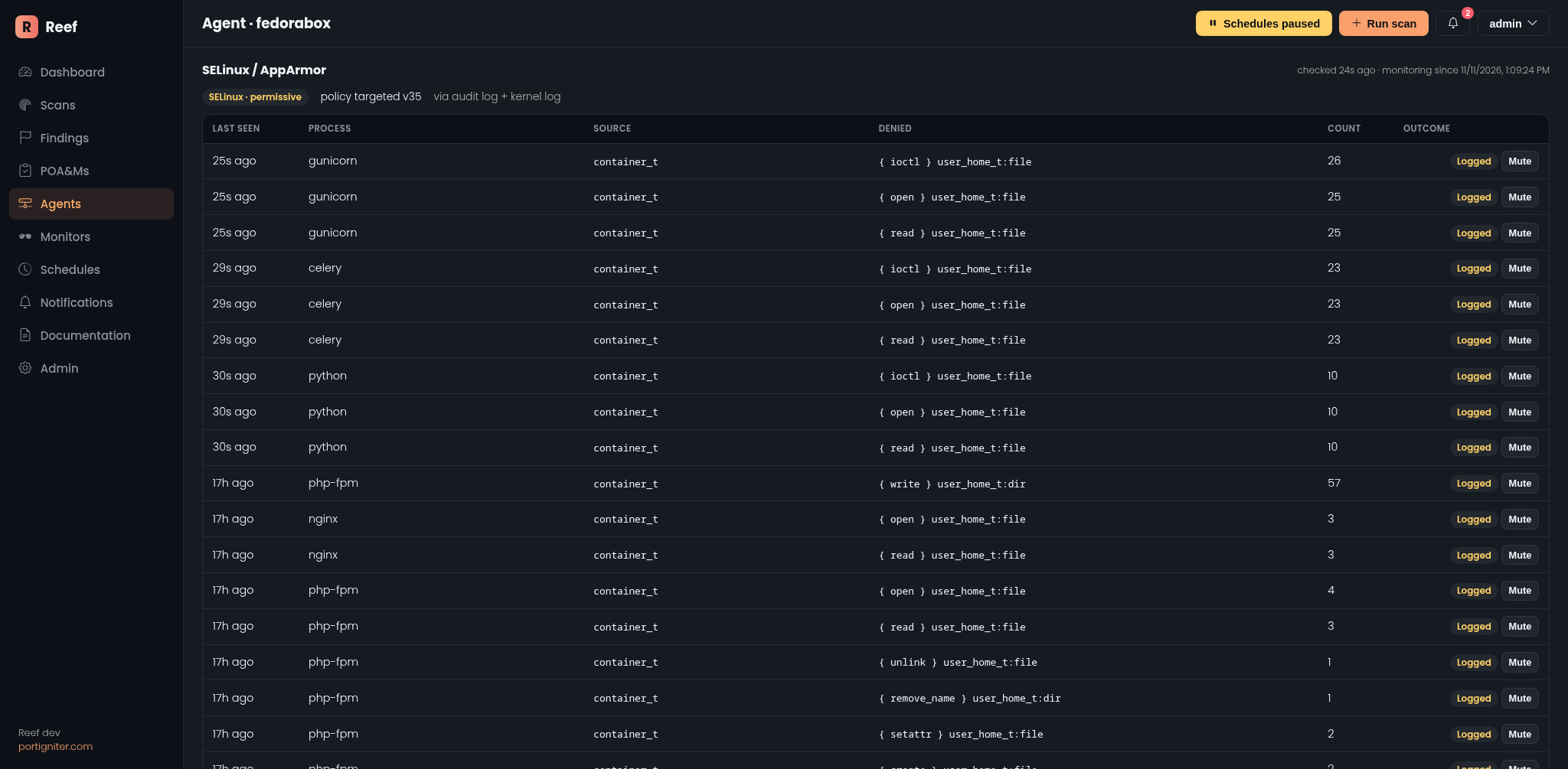
Agents now check for SELinux or AppArmor on their own. There’s nothing to set up and no scan to schedule: like disk health and USB monitoring, it runs in the background as soon as the agent starts. If a host runs neither, the feature stays off and the agent page says so.
When one is active, Reef reads its denials straight from the host: the audit
log when auditd is running, or the kernel log when it isn’t (the usual setup
on Ubuntu and Debian). You’ll find them under SELinux / AppArmor on each
agent’s page:
- The current mode at a glance. Enforcing or permissive for SELinux, plus the policy in use. For AppArmor, how many profiles enforce and how many only complain.
- Grouped, not flooded. A misbehaving service can log thousands of denials an hour. Reef groups them by who was denied what, with a running count, so a storm becomes one row that says “1,284 times.”
- Blocked or just logged. Each row tells you whether the access was actually stopped, or only logged because the system (or that one program) is in permissive or complain mode. The second kind is your preview of what will break the day you switch enforcement on.
- Mute what’s expected. Known and harmless? Mute it and it won’t alert again.
From “it just doesn’t work” to an answer
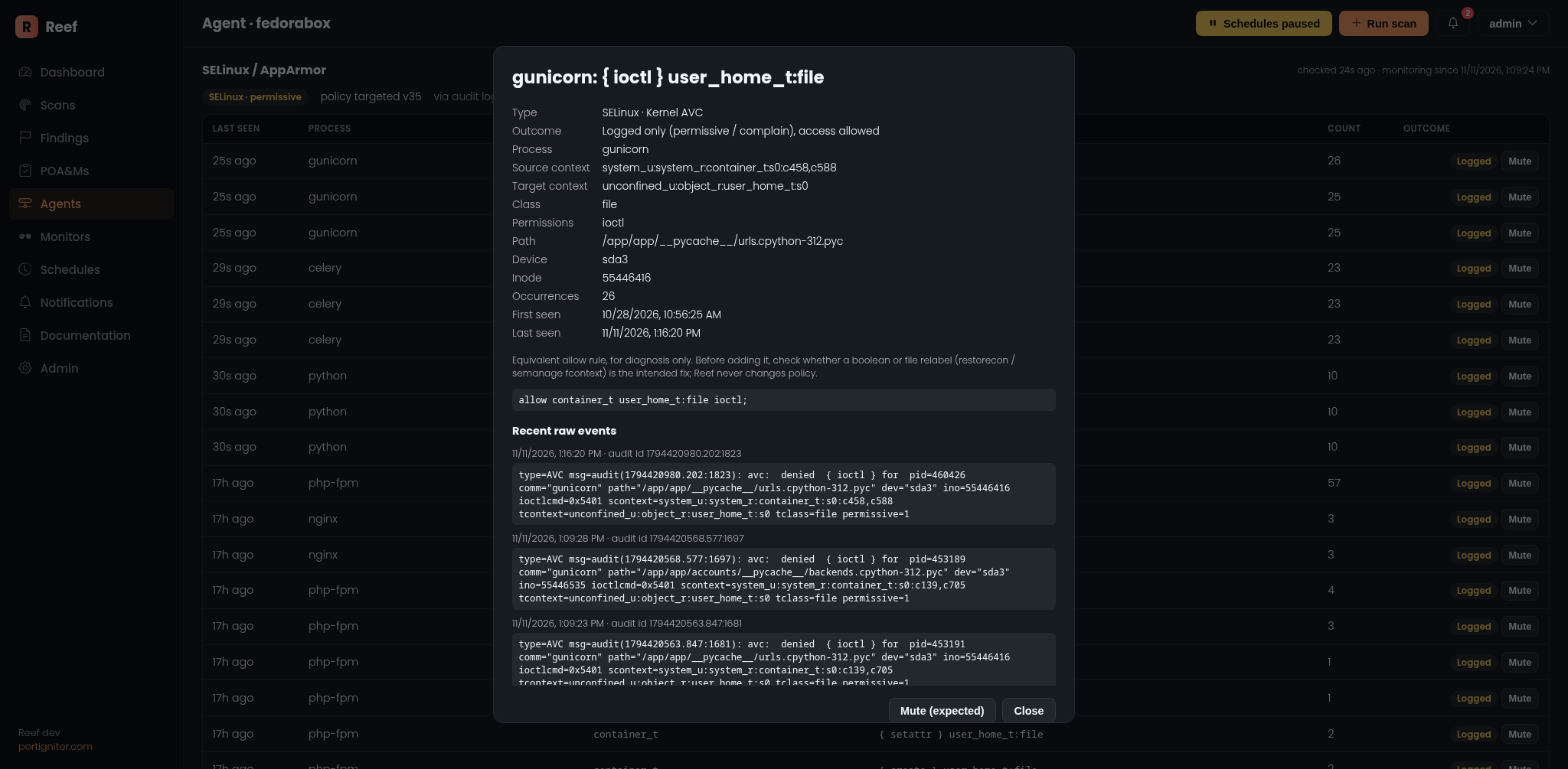
Click any row to see everything behind it: the program and its full path, the security contexts on both sides, the file it was reaching for, the command line, and the raw audit records themselves.
The screenshots above came from my own development machine, and Reef caught
something real on its very first run. Reef’s own containers were reading
source files bind-mounted from my home directory without an SELinux relabel.
In permissive mode nothing seemed wrong. Switch to enforcing and those
containers would have stopped working, with nothing to explain why. One look
at the detail view gives it away: container_t denied read on
user_home_t. That’s a missing :z on a volume mount, a one-character fix.
For SELinux denials, Reef also shows the equivalent allow rule, the same
thing audit2allow would suggest. It’s there to help you understand the
denial, not as a recommendation. A boolean or a file relabel is often the
right fix.
The security side: knowing when the guard is down
Denials are only half the story. Reef also tells you when the protection itself gets weaker:
- SELinux switched to permissive raises a critical alert, including who
did it when the audit trail records it. Because the switch is read from the
audit log, a quick
setenforce 0, followed by whatever was done, followed bysetenforce 1, still gets caught even if it all happens between two checks. - The boot config changing (for example
/etc/selinux/configno longer saying enforcing) is flagged before the next reboot quietly makes it real. - An AppArmor profile dropping from enforce to complain raises a warning that names the profile.
- SELinux boolean changes are recorded on the agent page, with an info notification.
Alerts are built to stay useful. On first start, Reef records the denials already in the logs as a starting point and sends a single summary, not one alert per old entry. After that, you hear about new kinds of denials: several at once become one notification, and a denial that comes back after a quiet day reminds you once.
Also fixed: the agent page holds its place
The agent page refreshes itself every 30 seconds, and until now every refresh snapped you back to the top. If you were halfway down the USB list, that was annoying fast.
That’s fixed. Refreshes now update each section in place: charts redraw where they are, scrollable lists keep their position, and if new data appears above you (say, a newly connected USB device), the page adjusts so what you were reading stays put. Pages in background tabs also stop refreshing until you come back to them.
Getting it
Pull the new Reef and Reef agent images and restart. Update the agents too: the monitoring runs agent-side. The database upgrade runs automatically when the web container starts.
No .env changes are needed. Monitoring is on by default and checks every 30
seconds. To change that, set REEF_MAC_INTERVAL (in seconds), or set it to
0 to turn the feature off. The stock docker-compose.yml already mounts the
host’s audit log for the agent.
Immediately available
If you’ve been on the fence about Reef, now is a great time to give it a try. Every release adds more visibility into your systems with less effort on your part, and there’s plenty more on the way. Give it a shot and let me know what you think!
Standard Edition is available now: buy a Standard license.