
More than courses
A lot of what technical trainers make isn’t a course. It’s the lab workbook that goes with the course, the cheat sheet people tape to their monitor, or the 60 page troubleshooting guide you wrote after the third time someone asked the same question. Until now, PortIgniter LMS only allowed you to sell one of those things.
PortIgniter LMS 2026.11.15 adds the Library: a place to sell documents right next to your courses, with the same pricing, sales, bundles and memberships. I also never got around to announcing the last big release, so this post covers bundles and scheduled sales too. Together they turn the LMS from a course platform into a proper storefront for everything you teach.
The Library
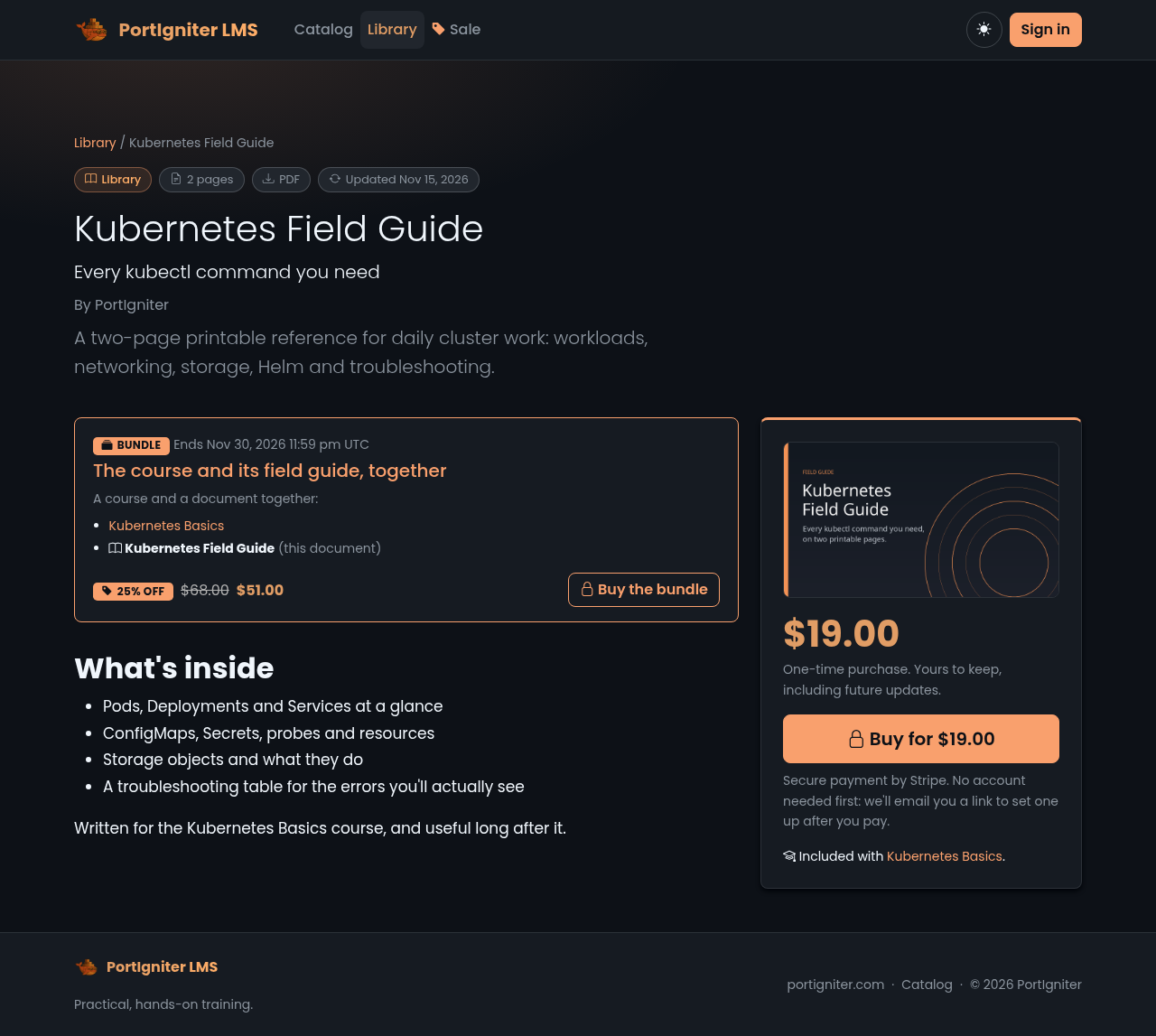
Administrators add documents under Administration > Library documents: a title, cover, description, price (or free) and up to ten files. PDF, EPUB, ZIP, Word, Excel, PowerPoint, OpenDocument and plain text files are all accepted. Published documents appear on a new Library page, and the catalog search finds them too, so someone looking for “Kubernetes” sees your course and your field guide.
Here’s what buyers get:
- Download it, or read it right in the browser. PDFs open in a built-in reader with page navigation and zoom. There’s no third-party viewer and nothing loads from a CDN.
- Their name on every page. Each PDF is stamped at the foot of every page with “Licensed to Jane Doe (jane@example.com) on 15 Nov 2026” at the moment it’s downloaded. It’s a gentle, honest way to discourage passing copies around, and the original file on your server is never changed.
- Updates for as long as they own it. Replace a file with a new edition and everyone who owns the document gets an email saying what changed. Learners can turn those emails off in their profile.
- A “My library” page in the account menu that lists everything they own.
And everything you already use for courses works for documents:
- Free documents for lead magnets and sample chapters. Signing in is all it takes.
- Attach documents to a course. Everyone enrolled in the course gets them, so the workbook comes included instead of being sold twice.
- Include them in memberships. A plan can now cover every document, chosen documents or none, alongside its courses.
- Give a copy to anyone by email, for reviewers, partners or customer service fixes.
- Refunds and disputes pause access automatically, just like they do for courses.
The new Library docs page walks through every setting.
qpdf, which does the stamping without touching anything else in your PDF: bookmarks, links and forms all survive.
Bundles
Bundles were part of the previous release, and they’ve grown in this one. A bundle is a fixed set of things sold together at a percentage off the combined price: a course plus its workbook, a full learning path, or a whole shelf of guides. You pick from 2 to 20 items, mixing courses and documents freely, set the discount, and choose when it starts and ends.
What makes them fair to your buyers:
- People only pay for what they don’t already have. If someone already owns one course from the bundle, their price drops by that course’s share. Already own almost all of it? The bundle is no longer offered to them, so nobody pays twice.
- A bundle never costs more than buying the same items separately during a sale.
- One checkout, one receipt, and access to everything at once. A full refund pauses the whole bundle.
Bundles show up on each included course’s page, on the catalog, and on their own landing page you can link to from email or social media. See Bundles in the docs.
Scheduled sales
Administration > Promotions puts things on sale for a set window: say, 30% off from Black Friday morning to Cyber Monday night. Choose the percentage, the start and end times (entered in your own time zone), and what it covers. Sales could already cover all paid courses or a hand-picked list. Now they can also cover all documents, everything, or a list that mixes courses and documents.
While a sale is live:
- Prices show the original struck through, a “% off” tag and the sale price, on the catalog, the course or document page and a sale landing page.
- A Sale link appears in the navigation bar, and disappears again on its own when the sale ends.
- Checkout charges the sale price, worked out on the server, and every payment records which sale it came from in Admin > Sales.
Set it up a week ahead, and it starts and stops while you sleep. See Selling Courses for details.
Also in this release
- A calmer navigation bar. As features piled up, the top bar got crowded. It now holds only what people use every visit: Catalog, Library, Memberships, and Sale while one is running, plus the course tools for instructors. Everything else, including all the administration pages, lives in the account menu under its own Administration heading.
- Your own home page section. The four feature tiles at the bottom of the home page are now yours to edit under Administration > Settings > Home page. Use one to four columns, each a tile (with any of the built-in Bootstrap icons, picked from a searchable list), Markdown text, or an image, with optional links. Or switch the section off.
- Free preview lessons (from the bundles release). Mark any lesson as a free preview and visitors can open it without an account, video and downloads included, with your Buy or Enroll button right there.
Getting it
Pull the new lms image (2026.11.15) and restart. The database upgrade runs
automatically when the container starts. No .env changes are needed and no new Stripe
webhook events are required: documents and bundles use the checkout events you already have.
Two optional settings arrived with the Library: lms.libraryMaxMb (the largest file you can
upload, 200 MB by default) and lms.qpdfPath, which you’ll only need if you run the LMS
outside the Docker image.
Your whole catalog, one place
If you’ve been keeping workbooks on a separate store or emailing PDFs by hand, now’s the time to bring them home. Sell them next to your courses, bundle them together, put them on sale, and keep every penny in your own Stripe account.
Get PortIgniter LMS for $100: full source, a year of updates, and yours to keep forever.