This guide walks you through installing Reef, connecting your first monitored host, and running a scan. The full configuration reference is at the end of this page.
Prerequisites
Docker and Docker Compose are the only requirements. Everything else, including the web application, the background services, and all of the scan tools, ships inside the Reef images. If you are not comfortable with Docker, I offer a free course that covers everything you need to know to get up and running fast: Docker Basics.
1. Log in to the PortIgniter registry
Reef images are pulled from the PortIgniter registry. Log in with the email address you used when you purchased your license. Your password is the license key itself.
docker login registry.portigniter.com
If you skip this step, image pulls will fail with an authentication error.
2. Configure your environment
Create a .env file in the directory where you will keep your docker-compose.yml. At a minimum, set the following:
| Variable | What it’s for |
|---|---|
DJANGO_SECRET_KEY |
Signs sessions and other security-sensitive data. Generate a long random value. |
DJANGO_API_KEYS |
A comma-separated list of API keys the server accepts. |
REEF_AGENT_API_KEY |
The key your agents use to authenticate. It must match one of the values in DJANGO_API_KEYS. |
DJANGO_ALLOWED_HOSTS |
Every hostname or IP address you will use to open the dashboard. |
DJANGO_SUPERUSER_* |
The administrator login that is created automatically on first start. |
You can generate a strong key with openssl rand -hex 32. Below is the complete example .env file. Not every value is required, and each setting is explained in the Configuration reference below.
# Copy to .env and fill in real values:  cp .env.example .env
# .env is gitignored and is read by both docker compose and the app container.

# --- Django ---------------------------------------------------------------
# Generate with:
#   python -c 'from django.core.management.utils import get_random_secret_key; print(get_random_secret_key())'
DJANGO_SECRET_KEY=replace-me
# "true" enables debug mode. Leave false for anything shared/deployed.
DJANGO_DEBUG=false
# Required when DJANGO_DEBUG=false. Comma-separated, no spaces.
# The compose service name `web` is added automatically (the agent, worker and
# beat containers reach the web service by that name); override with
# REEF_INTERNAL_WEB_HOST if you rename the service.
DJANGO_ALLOWED_HOSTS=localhost,127.0.0.1
# Any host/IP you open the UI on. Reaching it by LAN IP or hostname without
# adding it here gives a bare "Bad Request (400)" page.
#   e.g. DJANGO_ALLOWED_HOSTS=localhost,127.0.0.1,192.168.1.50,reef.example.com
#
# CSRF trust for POST actions (login, acknowledge, run scan, ...). Leave BLANK
# and every concrete host above is trusted automatically on http+https, bare and
# :8000. Set it explicitly (scheme required) only to override that:
#   e.g. DJANGO_CSRF_TRUSTED_ORIGINS=https://reef.example.com
DJANGO_CSRF_TRUSTED_ORIGINS=
# "true" when a TLS-terminating proxy / load balancer sits in front (it forwards
# plain http to the app). Makes Django trust X-Forwarded-Proto / -Host.
DJANGO_TRUST_PROXY=false

# --- Superuser -----------------------------------------------------------
# Created on first container start by entrypoint.sh (manage.py ensure_superuser).
DJANGO_SUPERUSER_USERNAME=admin
DJANGO_SUPERUSER_PASSWORD=replace-me
DJANGO_SUPERUSER_EMAIL=admin@example.com

# --- API keys ----------------------------------------------------------
# Accepted in the `X-API-Key` header by the token-protected API routes and by
# the agent. Comma-separated; supply several to allow rotation.
# Generate one with:  python -c 'import secrets; print(secrets.token_urlsafe(32))'
DJANGO_API_KEYS=

# --- Agent -------------------------------------------------------------
# The agent authenticates with this key; it MUST be one of DJANGO_API_KEYS.
REEF_AGENT_API_KEY=
# Optional; defaults to the monitored host's /etc/hostname (stable across restarts).
REEF_AGENT_NAME=
# Seconds between job polls / heartbeats.
REEF_POLL_INTERVAL=15

# --- Reef behaviour --------------------------------------------------
# Findings at or above this severity raise a notification (info|low|medium|high|critical).
REEF_NOTIFY_MIN_SEVERITY=high
# An agent with no check-in for this long is marked offline.
REEF_AGENT_OFFLINE_AFTER_SECONDS=300
# When "true", the auditd scan loads Reef's audit.rules into the host kernel
# (auditctl -R). Leave "false" to only *report* which rules are missing. To also
# persist the ruleset across reboots, add a read-write mount of /etc/audit to the
# agent service in docker-compose.yml.
REEF_AUDIT_MANAGE=false
# Size cap for the agent's scan scratch tmpfs (syft/grype temp files + the
# intermediate SBOM the grype scan builds). RAM-backed: size it to what the host
# can spare. A scan that needs more space fails cleanly with ENOSPC rather than
# filling the host disk. Grype's vuln DB lives on the grype-db volume, not here.
REEF_SCAN_TMP_SIZE=2g

# --- Celery ---------------------------------------------------------
# docker-compose sets these; override here if pointing at an external Redis.
# CELERY_BROKER_URL=redis://redis:6379/0
# CELERY_RESULT_BACKEND=redis://redis:6379/1

# --- SQLite3 ------------------------------------------------------
# Path inside the container (mounted volume so the DB survives rebuilds).
SQLITE_PATH=/data/db.sqlite3

# --- AI interpretation (optional, opt-in) -----------------------------
# Adds an "Interpret" button to the scan detail page and finding modals that
# sends scan/finding data to a local Ollama model and shows back a plain-
# language summary. Off unless OLLAMA_ENABLED=true. Needs real memory/CPU to
# run acceptably -- leave this off on a small box.
#
# 1. Uncomment the four lines below.
# 2. Start the bundled Ollama service too:
#      COMPOSE_PROFILES=ollama docker compose up -d
#    (or add `COMPOSE_PROFILES=ollama` as its own line in this file). The
#    `ollama-init` one-shot service pulls OLLAMA_MODEL on first start.
# OLLAMA_ENABLED=true
# OLLAMA_URL=http://ollama:11434
# OLLAMA_MODEL=llama3.2:3b
# OLLAMA_MEM_LIMIT=8g
DJANGO_SECRET_KEY, DJANGO_API_KEYS, and REEF_AGENT_API_KEY to unique, random values before exposing Reef to anyone else. Leave DJANGO_DEBUG=false on any shared or production system.
3. Create your compose file
Server and local agent
The compose file below runs the complete Reef stack on a single server, along with an agent that monitors that same server. For additional hosts, use the agent-only file in the next section.
The ollama service powers the optional AI interpretation feature. I recommend leaving it off unless your server has plenty of memory and CPU to spare. You can also point Reef at an existing Ollama endpoint instead of running the bundled one.
name: portigniter-reef

x-app: &app
  # Check the product page for the latest release
  image: registry.portigniter.com/reef:2026.10.28
  env_file: .env
  environment:
    SQLITE_PATH: ${SQLITE_PATH:-/data/db.sqlite3}
    CELERY_BROKER_URL: redis://redis:6379/0
    CELERY_RESULT_BACKEND: redis://redis:6379/1
  volumes:
    - "app-data:/data"
  depends_on:
    redis:
      condition: service_healthy
  restart: unless-stopped

services:
  web:
    <<: *app
    command: ["web"]
    ports:
      - "8000:8000"
    healthcheck:
      # green once gunicorn is actually serving -- lets the agent wait for a
      # listening port instead of logging a startup "connection refused".
      test: ["CMD", "python", "-c", "import urllib.request,sys; sys.exit(0 if urllib.request.urlopen('http://localhost:8000/api/health/', timeout=3).status == 200 else 1)"]
      interval: 10s
      timeout: 5s
      retries: 6
      start_period: 40s

  worker:
    <<: *app
    command: ["worker"]
    depends_on:
      redis:
        condition: service_healthy
      web:
        condition: service_started

  beat:
    <<: *app
    command: ["beat"]
    depends_on:
      redis:
        condition: service_healthy
      web:
        condition: service_started

  redis:
    image: redis:7.4.10-alpine
    command: redis-server --appendonly yes  # Enable AOF
    healthcheck:
      test: ["CMD", "redis-cli", "ping"]
      interval: 5s
      timeout: 3s
      retries: 5
    volumes:
      - redis-data:/data
    restart: unless-stopped

  agent:
    image: registry.portigniter.com/reef-agent:2026.10.28
    env_file: .env
    environment:
      REEF_API_URL: http://web:8000
      REEF_SCAN_ROOT: /host
      # Persist grype's vulnerability DB (grype-db volume) so it isn't
      # re-downloaded and rebuilt (~1-2 GB) on every scan.
      GRYPE_DB_CACHE_DIR: /var/cache/grype
      # syft/grype scratch + our intermediate SBOM land here -- a size-capped
      # tmpfs (see below), so a runaway catalogue can't fill the host disk.
      TMPDIR: /scan-tmp
      # REEF_AUDIT_MANAGE (from .env): when true the auditd scan loads Reef's
      # ruleset into the host kernel. To also persist it across reboots, add a
      # read-write mount:  - "/etc/audit:/host/etc/audit:rw"
    # Privileged + host PID + host root are what let lynis / clamav / FIM see the
    # real system. The host filesystem is mounted read-only.
    privileged: true
    pid: "host"
    volumes:
      - "/:/host:ro"
      - "/var/log/audit:/var/log/audit:ro"
      - "clamav-db:/var/lib/clamav"
      - "grype-db:/var/cache/grype"
      - "agent-state:/var/lib/reef"
    # Hard cap on scan scratch space. It's RAM-backed: size it to what the host
    # can spare (REEF_SCAN_TMP_SIZE in .env). A scan that needs more fails
    # cleanly with ENOSPC instead of eating the disk. Swap to a named volume
    # here if you'd rather trade the disk risk back for not spending RAM.
    tmpfs:
      - "/scan-tmp:size=${REEF_SCAN_TMP_SIZE:-2g},mode=1777"
    depends_on:
      web:
        condition: service_healthy
    restart: unless-stopped
    healthcheck:
      # green once the poll loop has written its heartbeat in the last 2 min
      test: ["CMD", "python3", "-c", "import os,time,sys; f='/tmp/reef-agent.heartbeat'; sys.exit(0 if os.path.exists(f) and time.time()-os.path.getmtime(f) < 180 else 1)"]
      interval: 20s
      timeout: 5s
      retries: 3
      start_period: 60s

  # Local LLM for the opt-in "Interpret" feature (scan/finding AI summaries).
  # Off by default -- only started with `docker compose --profile ollama up`
  # (or COMPOSE_PROFILES=ollama in .env). Also set OLLAMA_ENABLED=true plus
  # OLLAMA_URL/OLLAMA_MODEL in .env so the web/worker containers pick it up;
  # see .env.example.
  ollama:
    image: ollama/ollama:latest
    profiles: ["ollama"]
    environment:
      OLLAMA_HOST: 0.0.0.0
    volumes:
      - ollama-data:/root/.ollama
    # Small model (~2GB) -- still give the container a memory ceiling so a
    # customer on a modest box can't have it pushed into OOM-killing something
    # else. Override via OLLAMA_MEM_LIMIT in .env.
    mem_limit: ${OLLAMA_MEM_LIMIT:-8g}
    healthcheck:
      test: ["CMD", "ollama", "list"]
      interval: 10s
      timeout: 5s
      retries: 6
      start_period: 20s
    restart: unless-stopped

  # One-shot: pulls the model into the `ollama-data` volume, then exits.
  # Re-running compose is a no-op once the model is already pulled.
  ollama-init:
    image: ollama/ollama:latest
    profiles: ["ollama"]
    environment:
      OLLAMA_HOST: http://ollama:11434
    entrypoint: ["ollama", "pull", "${OLLAMA_MODEL:-llama3.2:3b}"]
    depends_on:
      ollama:
        condition: service_healthy
    restart: "no"

volumes:
  app-data: {}
  redis-data: {}
  clamav-db: {}
  grype-db: {}
  agent-state: {}
  ollama-data: {}
Agent-only hosts
Use this file on every additional host you want to monitor. Set REEF_API_URL to the address of your Reef server.
name: portigniter-reef

services:
  agent:
    image: registry.portigniter.com/reef-agent:2026.10.28
    env_file: .env
    environment:
      REEF_API_URL: https://reef.yourdomain.com
      REEF_SCAN_ROOT: /host
      # Persist grype's vulnerability DB (grype-db volume) so it isn't
      # re-downloaded and rebuilt (~1-2 GB) on every scan.
      GRYPE_DB_CACHE_DIR: /var/cache/grype
      # syft/grype scratch + our intermediate SBOM land here -- a size-capped
      # tmpfs (see below), so a runaway catalogue can't fill the host disk.
      TMPDIR: /scan-tmp
      # REEF_AUDIT_MANAGE (from .env): when true the auditd scan loads Reef's
      # ruleset into the host kernel. To also persist it across reboots, add a
      # read-write mount:  - "/etc/audit:/host/etc/audit:rw"
    # Privileged + host PID + host root are what let lynis / clamav / FIM see the
    # real system. The host filesystem is mounted read-only.
    privileged: true
    pid: "host"
    volumes:
      - "/:/host:ro"
      - "/var/log/audit:/var/log/audit:ro"
      - "clamav-db:/var/lib/clamav"
      - "grype-db:/var/cache/grype"
      - "agent-state:/var/lib/reef"
    # Hard cap on scan scratch space. It's RAM-backed: size it to what the host
    # can spare (REEF_SCAN_TMP_SIZE in .env). A scan that needs more fails
    # cleanly with ENOSPC instead of eating the disk. Swap to a named volume
    # here if you'd rather trade the disk risk back for not spending RAM.
    tmpfs:
      - "/scan-tmp:size=${REEF_SCAN_TMP_SIZE:-2g},mode=1777"
    restart: unless-stopped
    healthcheck:
      # green once the poll loop has written its heartbeat in the last 2 min
      test: ["CMD", "python3", "-c", "import os,time,sys; f='/tmp/reef-agent.heartbeat'; sys.exit(0 if os.path.exists(f) and time.time()-os.path.getmtime(f) < 180 else 1)"]
      interval: 20s
      timeout: 5s
      retries: 3
      start_period: 60s

volumes:
  clamav-db: {}
  grype-db: {}
  agent-state: {}
The agent-only .env file looks like this. Its REEF_AGENT_API_KEY must match one of the DJANGO_API_KEYS on your Reef server.
# --- Agent -------------------------------------------------------------
# The agent authenticates with this key; it MUST be one of DJANGO_API_KEYS.
REEF_AGENT_API_KEY=somelongkeyhere
# Optional; defaults to the monitored host's /etc/hostname.
REEF_AGENT_NAME=
# Seconds between job polls / heartbeats.
REEF_POLL_INTERVAL=15

# --- Reef behaviour --------------------------------------------------
REEF_NOTIFY_MIN_SEVERITY=high
REEF_AGENT_OFFLINE_AFTER_SECONDS=300
# "true" => auditd scan loads Reef's audit.rules into the host kernel.
REEF_AUDIT_MANAGE=false
# Size cap for the agent's scan scratch tmpfs (syft/grype temp + intermediate
# SBOM). RAM-backed; a scan needing more fails cleanly instead of filling disk.
REEF_SCAN_TMP_SIZE=2g
4. Start Reef
Place docker-compose.yml in the same directory as your .env file, on the server and on every agent-only host, then start the stack:
# Start Reef without the AI feature
docker compose up -d

# Start Reef with the bundled Ollama service
docker compose --profile ollama up -d
On first start, Reef prepares its database, creates your administrator account, and adds a default set of scan schedules:
| Scan | Default schedule |
|---|---|
| File Integrity Monitoring | Daily |
| Auditd | Hourly |
| Lynis | Weekly |
| ClamAV | Daily |
| YARA | Daily |
| Grype | Daily |
| OpenSCAP (CIS Level 1 Server) | Weekly |
You can adjust these schedules later from the admin area at /admin/scanning/scanschedule/, and you can remove any scans that don’t apply to your environment.
5. Log in and confirm the agent checked in
Open http://localhost:8000/, or your domain name if Reef sits behind a reverse proxy. You should see the login page.
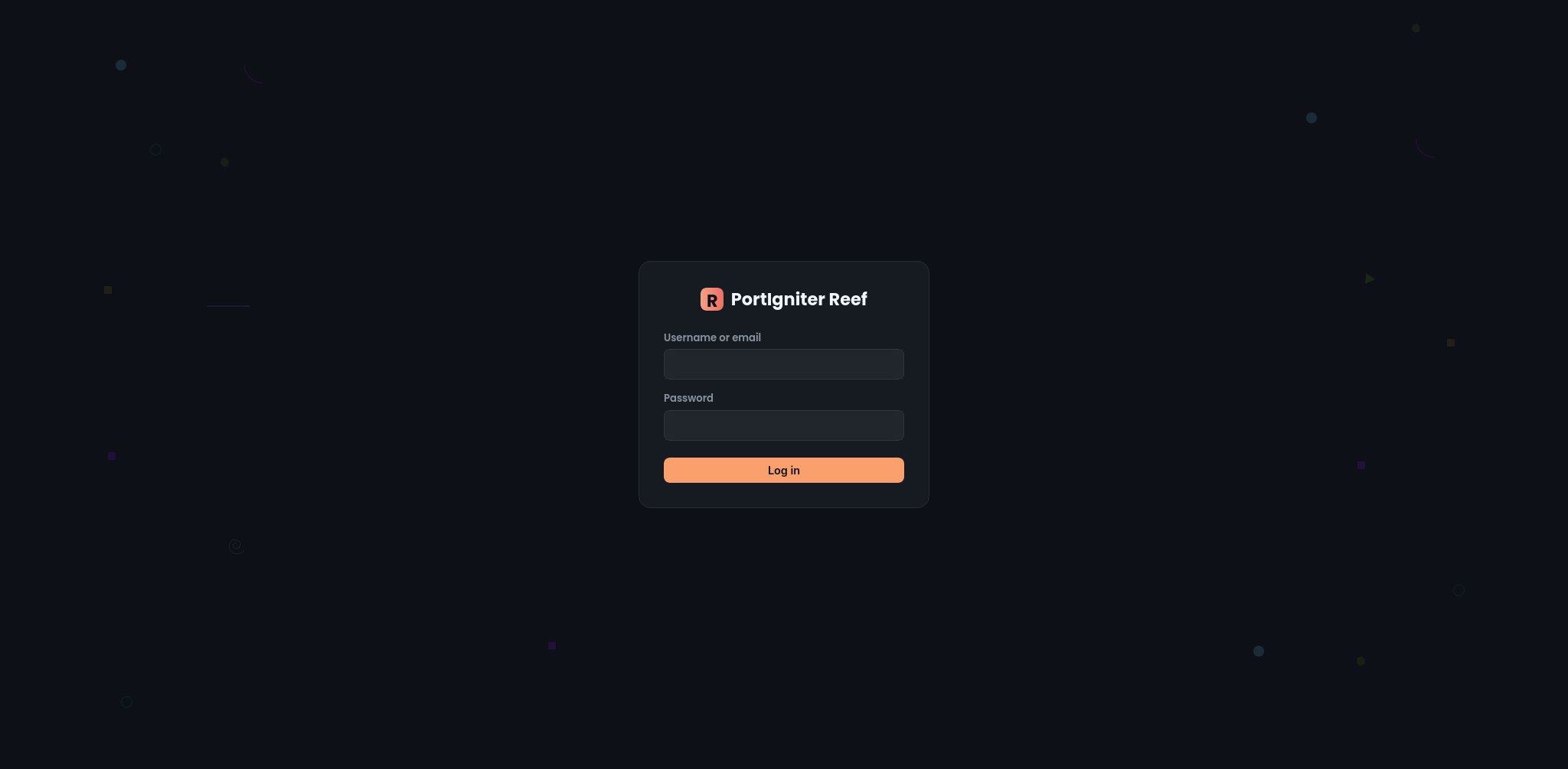
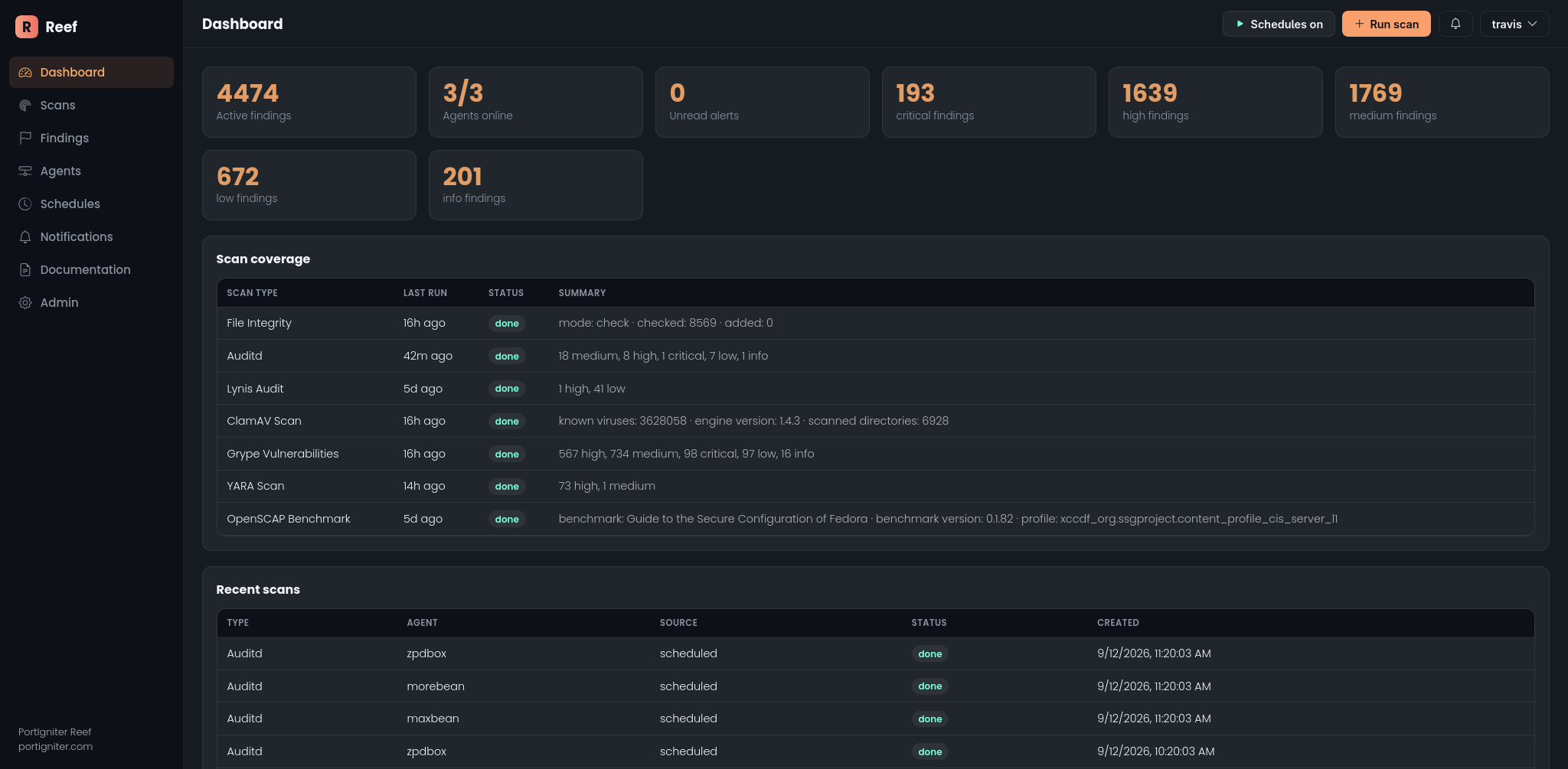
Log in with the administrator credentials from your .env file. After logging in, you will land on the Reef Dashboard.
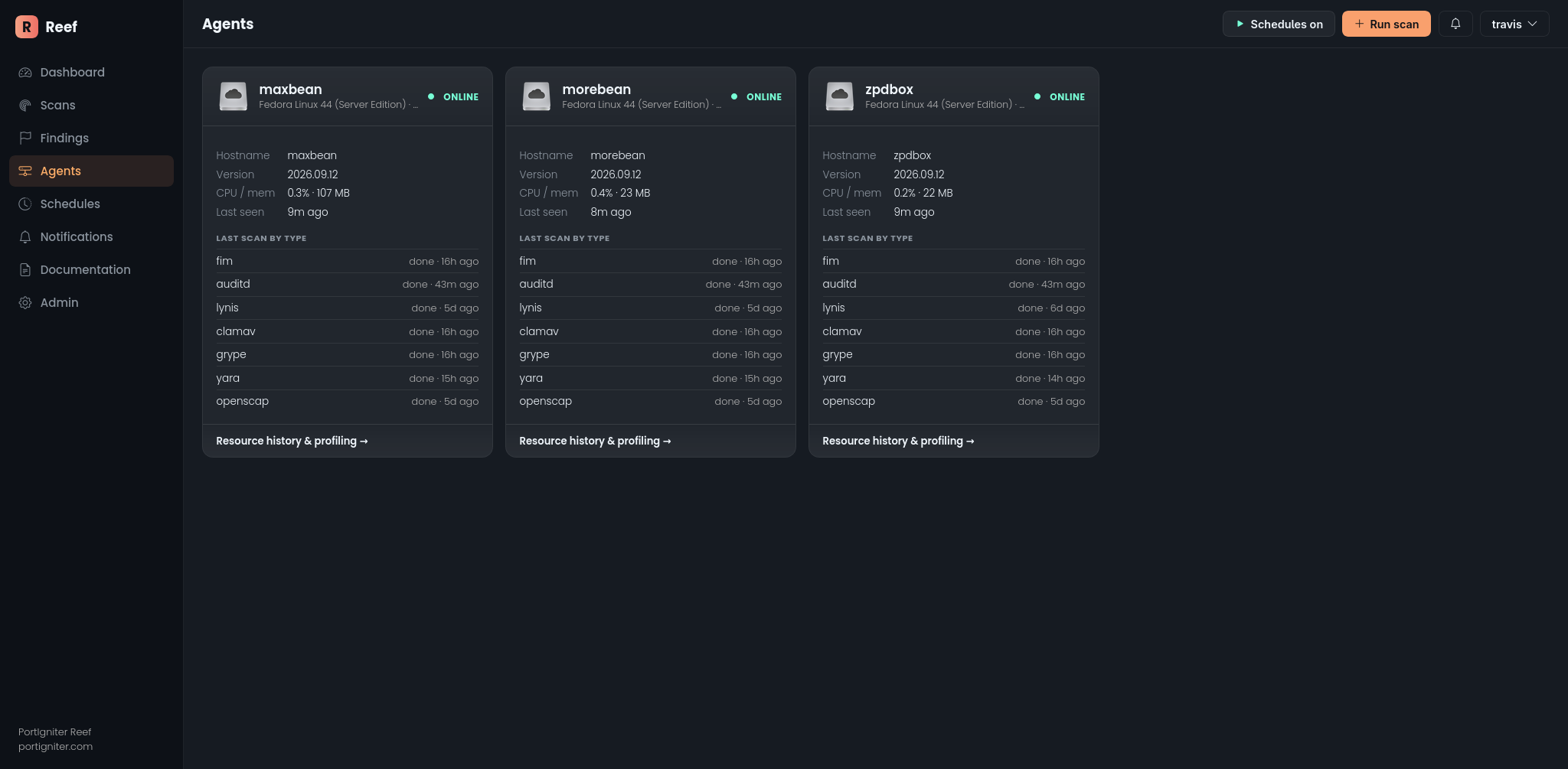
Click Agents in the navigation menu. Within about 15 seconds, each configured agent should show as online. On a first deployment, you will only see the agent running on the Reef server itself. The example below shows a setup with three agents.
6. Run your first scan
A Lynis scan is the easiest first test. Click Run scan, choose Lynis, and open the job. The detail page refreshes on its own until the scan is marked done. Results then appear on the Findings page, and the scan summary shows the host’s hardening index.
Any high or critical finding also raises a notification, which appears under the bell icon in the dashboard header.
7. Watch File Integrity Monitoring detect a change
Next, choose Run scan → File Integrity twice:
- The first run records a baseline and reports no findings.
- On the host,
touchor edit a file under/etc, then run the scan again. The changed file now appears as a finding.
8. Let the schedules run
Leave the stack running, and Reef will start running the default schedules automatically. No further action is needed.
Configuration reference
All Reef settings are environment variables in your .env file. Everything not listed as required in step 2 has a working default.
Web access and networking
| Variable | Default | Meaning |
|---|---|---|
DJANGO_DEBUG |
false |
Set to true only for local testing. |
DJANGO_ALLOWED_HOSTS |
localhost,127.0.0.1 |
Comma-separated hostnames and IP addresses allowed to reach the dashboard. The internal web service name is always added for you. |
REEF_INTERNAL_WEB_HOST |
web |
The internal name agents and background services use to reach the web service. Change this only if you rename the web service in compose. |
DJANGO_CSRF_TRUSTED_ORIGINS |
Derived from DJANGO_ALLOWED_HOSTS |
Leave blank so every allowed host is trusted automatically. Set it only to override that behavior. |
DJANGO_TRUST_PROXY |
false |
Set to true when Reef sits behind a reverse proxy or load balancer that handles TLS. |
Opening Reef by IP address or a new hostname. If you see a bare “Bad Request (400)” page, add that address to DJANGO_ALLOWED_HOSTS and restart. Each host listed there is trusted for form submissions automatically, so logging in, running scans, and updating findings all work without a second setting. If you run Reef behind a TLS-terminating proxy, also set DJANGO_TRUST_PROXY=true.
Authentication
| Variable | Default | Meaning |
|---|---|---|
DJANGO_API_KEYS |
None | Comma-separated keys accepted by the API. List more than one to rotate keys without downtime. |
REEF_AGENT_API_KEY |
None | The key agents use. It must be one of DJANGO_API_KEYS. |
DJANGO_SUPERUSER_* |
None | The administrator username, password, and email created on first start. |
Agents
| Variable | Default | Meaning |
|---|---|---|
REEF_AGENT_NAME |
The host’s /etc/hostname |
The name the agent reports to Reef. |
REEF_API_URL |
http://web:8000 |
The Reef server address, set in the agent’s compose file. |
REEF_SCAN_ROOT |
/host |
Where the host filesystem is mounted inside the agent. |
REEF_POLL_INTERVAL |
15 |
How often, in seconds, the agent checks in for new work. |
Notifications and health checks
| Variable | Default | Meaning |
|---|---|---|
REEF_NOTIFY_MIN_SEVERITY |
high |
The lowest severity that raises a notification: info, low, medium, high, or critical. |
REEF_AGENT_OFFLINE_AFTER_SECONDS |
300 |
How long an agent can go silent before it is marked offline. |
REEF_JOB_STALE_AFTER_SECONDS |
23400 (6.5 hours) |
How long a started scan can go without returning results before it is marked expired. |
DJANGO_EMAIL_BACKEND |
Console | Where notification email copies are sent. By default, they are written to the web container log. |
Agent resource metrics
| Variable | Default | Meaning |
|---|---|---|
REEF_METRIC_MIN_INTERVAL_SECONDS |
20 |
Minimum time between stored CPU and memory samples for each agent. |
REEF_METRIC_RETENTION_DAYS |
14 |
How long agent resource samples are kept. |
Scan tuning
| Variable | Default | Meaning |
|---|---|---|
REEF_FIM_DEFAULT_PATHS |
/etc,/bin,/sbin,/usr/bin,/usr/sbin,/boot |
Directories that File Integrity Monitoring watches. |
REEF_AUDIT_MANAGE |
false |
When true, the auditd scan loads Reef’s audit rules onto the host. See Auditd. |
REEF_AUDIT_RULES_PATH |
Bundled audit.rules |
The audit ruleset Reef compares the host against. |
REEF_SCAN_TMP_SIZE |
2g |
Scratch space for scans, held in memory. Size it to what the host can spare. A scan that runs out of space fails cleanly rather than filling the host disk. |
REEF_RAW_OUTPUT_MAX_BYTES |
24000000 |
The largest raw scan result Reef will store. |
REEF_GRYPE_SOFT_MAX_BYTES |
16000000 |
Size limit for Grype results. Larger results are trimmed of descriptive text first. |
REEF_YARA_SOFT_MAX_BYTES |
16000000 |
Size limit for YARA results. |
Storage
| Variable | Default | Meaning |
|---|---|---|
SQLITE_PATH |
/data/db.sqlite3 |
The Reef database file, stored on a Docker volume. |
GRYPE_DB_CACHE_DIR |
/var/cache/grype |
Where the agent keeps Grype’s vulnerability database between scans. |
CELERY_BROKER_URL / CELERY_RESULT_BACKEND |
redis://redis:6379/0 / /1 |
Set by compose. Change these only if you use an external Redis server. |
Optional AI interpretation
When enabled, an Interpret button appears on scan and finding pages. It sends that scan or finding to your Ollama model and returns a plain-language summary. With the bundled Ollama service, that data never leaves your Reef server. If you point Reef at a different Ollama endpoint, scan and finding details are sent to that endpoint.
| Variable | Default | Meaning |
|---|---|---|
OLLAMA_ENABLED |
false |
Set to true to turn on the Interpret feature. |
OLLAMA_URL |
http://ollama:11434 |
The Ollama endpoint. The default points to the bundled service. |
OLLAMA_MODEL |
llama3.2:3b |
The model used for interpretation. |
OLLAMA_MEM_LIMIT |
8g |
Memory limit for the bundled Ollama container. |
Next steps
- How Reef Works explains what each component does and where your data lives.
- Scans covers what each of the seven scan types checks.
- Management Commands covers maintenance tasks such as resetting data.