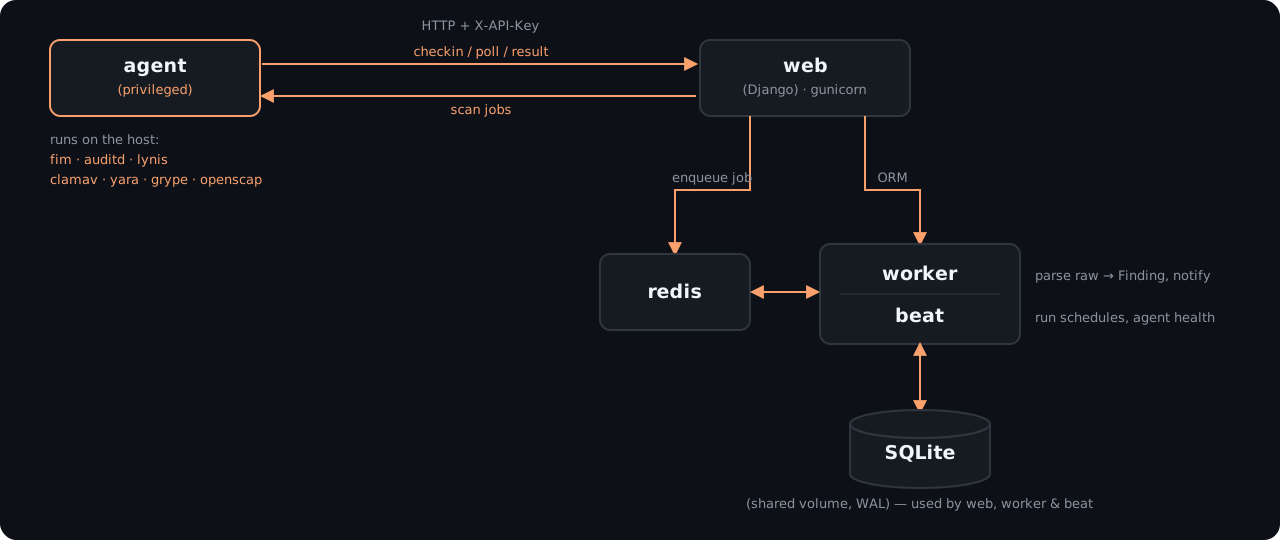
Reef has two parts: a central Reef server that you log in to, and a lightweight agent on every Linux host you want to monitor. The agent collects evidence, and the server makes sense of it.
The components
- Reef server. Hosts the dashboard, stores all results, runs the scan schedules, turns raw scan output into findings, and raises notifications. Behind the scenes it runs as a few cooperating containers (
web,worker,beat, andredis) from a single compose file. - Agent. One per monitored host. It checks in with the server every few seconds, runs whatever scans are due, and sends back the raw results. It does no analysis of its own.
- AI interpretation (optional). A local Ollama model that can summarize a scan or finding in plain language on request. It is off by default.
What happens during a scan
- A scan is started, either by a schedule or by someone clicking Run scan in the dashboard.
- On its next check-in, the agent on the target host picks up the job.
- The agent runs the scan tool against the host and sends the raw output back to the server.
- The server analyzes that output, records findings, and compares them with earlier results. New issues are opened, repeat sightings are updated, and issues that have gone away are closed automatically.
- Anything at or above your notification threshold raises an alert on the dashboard.
What the agent can access
The scanners need to see the real host, not the inside of a container, so the agent runs with elevated access:
- Privileged container with host process visibility. This lets tools such as Lynis, OpenSCAP, and auditd inspect the host’s running services, kernel settings, and audit subsystem.
- Read-only view of the host filesystem. The host’s root filesystem is mounted read-only, so scans can read files but cannot change them.
Reef is a detection tool. It never remediates findings or changes host configuration, with one opt-in exception: if you enable managed audit rules, the agent loads Reef’s audit ruleset onto the host.
What the agent does not have
The agent is intentionally kept simple. It has no database access and none of the server’s analysis logic. Its only credential is an API key, and its only job is to run the bundled scan tools and send back what they report. A compromised agent therefore exposes no more than the scan tools and the host’s own files. It does not expose your findings history or other hosts’ data.
All interpretation happens on the Reef server. That includes deciding what counts as a finding, how severe it is, and whether a vulnerability is on the CISA Known Exploited Vulnerabilities list.
What data leaves each host
Each agent sends the raw output of its scans to the Reef server and nothing else. Depending on the scan type, that output includes:
- File paths, hashes, and attributes (File Integrity Monitoring)
- Audit events and audit configuration (Auditd)
- Hardening results and system details (Lynis, OpenSCAP)
- Installed package inventory and matching CVEs (Grype)
- Paths or process IDs that matched a malware signature or rule (ClamAV, YARA)
Agents also report basic resource usage (CPU and memory) so you can see the performance cost of each scan.
Network connections
- Agent to Reef server. Every agent connects to the Reef server’s API. For agents on other hosts, put the server behind TLS and use an
https://address. - Signature and vulnerability updates. The agent refreshes ClamAV signatures when it starts, and Grype keeps its vulnerability database up to date. Both need outbound internet access. The CISA KEV catalog, NVD severity data, and OpenSCAP compliance content are built into each Reef release.
- Registry. Reef images are pulled from
registry.portigniter.com.
Authentication
- People log in to the dashboard with a username and password.
- Agents authenticate with an API key from
DJANGO_API_KEYS. You can list more than one key so that you can rotate keys without downtime. Today, all agents share the same key. Per-agent keys are on the Roadmap.
Where results are stored
All scans, findings, notifications, and agent history live in a single database on the Reef server, stored on the app-data Docker volume. Back up that volume to preserve your history. This design keeps Reef simple to run and maintain for a single server or a small fleet. PostgreSQL support for larger deployments is on the Roadmap.