
PortIgniter LMS is a small, readable CodeIgniter 4 application with a clear hierarchy: a course contains modules, and a module contains items (lessons, quizzes, and assignments). This page covers what runs, where everything is stored, and how the application keeps learners’ work and your content safe.
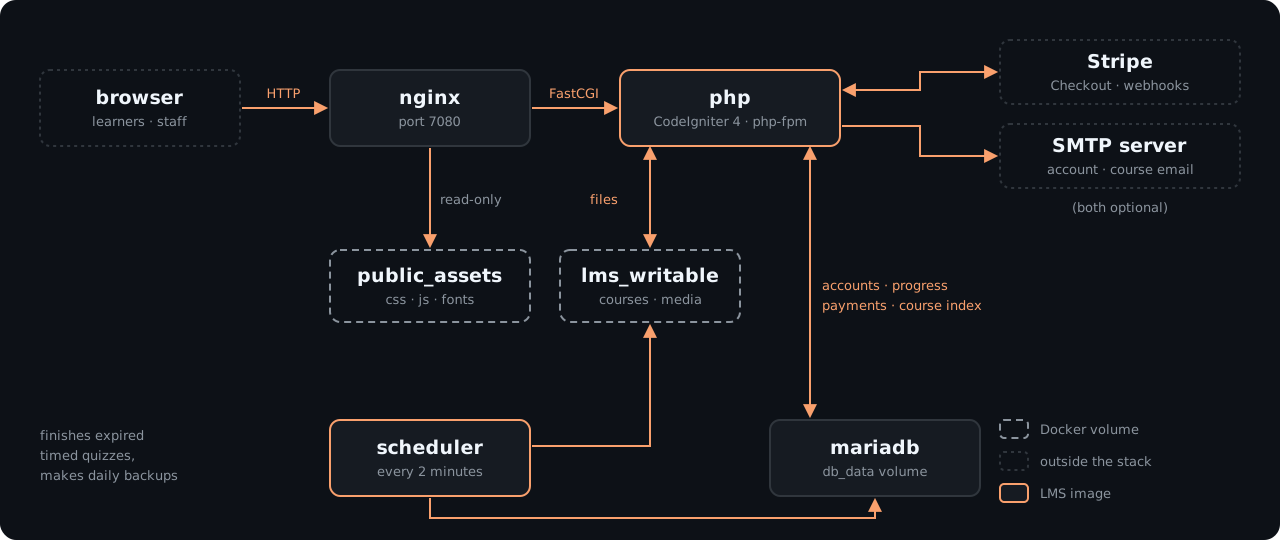
The components
| Container | What it does |
|---|---|
nginx |
The web server. It serves stylesheets, scripts, and images directly, and passes every other request to php. |
php |
The application. On every start, it applies database updates, creates the first administrator if needed, and publishes its static files for nginx. |
scheduler |
The same image as php, running a loop every 2 minutes. It submits timed quiz attempts whose time ran out and makes the daily backup when one is due. |
mariadb |
The database. It stores accounts, enrollments, progress, quiz attempts, payments, and the course index. Its port is never published outside the stack. |
writable-init |
A one-shot job that runs on each start, makes sure the data volumes are writable by the application, and then exits. |
Only php applies database updates, so the scheduler and any one-off commands never race it.
Courses are files
Every course is a folder of plain JSON files on the lms_writable volume:
writable/courses/<course-id>/
  draft/                 what the builder edits
    course.json          structure, settings, progression rules
    items/               one file per lesson
    quizzes/             one file per quiz (rules and question selection)
    assignments/         one file per assignment
    banks/               question banks
  published/             the frozen copy learners see
  assets/                images, video, audio, captions, and downloads
The files are the source of truth. The database holds an index of each course so that enrollments, progress, and reports have something to point at, and that index can be rebuilt from the files at any time with courses:reindex.
This design is what makes courses portable. You can export any course as a zip, import it on another site, keep it in Git, or write one by hand or with an AI assistant. See Course Files.
Draft and published
The builder only ever edits draft/. Learners only ever see published/. When you click Publish, PortIgniter LMS checks the whole draft and, if everything passes, replaces the published copy in one step.
Progress is tied to each item’s permanent ID, not its title or position. You can rename lessons, reorder modules, and republish as often as you like without resetting anyone’s progress.
Where your data lives
| Volume | What it holds |
|---|---|
lms_writable |
Course folders, uploaded media, learner submissions, avatars, branding images, certificate design images, backups, sessions, and logs. |
db_data |
The MariaDB database. |
public_assets |
The application’s own stylesheets, scripts, and fonts. It is rebuilt from the image on every start, so it never needs a backup. |
Back up lms_writable and db_data together. The built-in backup captures both in one file. See Backups & Upgrades.
How learners’ work is protected
- Grading happens on the server. Answer keys are stripped before a question is sent to the browser, so correct answers never appear in the page source.
- The quiz clock is the server’s. A timed attempt has a hard deadline stored on the server. Refreshing, closing the tab, or switching devices never resets it.
- Progression rules are enforced on the server. A locked lesson can’t be reached by guessing its URL.
- Every attempt is a snapshot. Each quiz attempt stores an exact copy of the questions it showed, so editing a question bank never rewrites someone’s history.
- Other people’s work stays private. Learners can’t reach another learner’s attempts, submissions, files, or certificates by changing an ID in the address bar.
How course media is protected
Course files are never served from a public folder. Every request for a video, image, or download goes through the application, which checks that the person is allowed to see it. Videos support seeking.
By default, PHP streams the file after the check. For sites with heavy video traffic, set lms.accelRedirect = true to hand the transfer to nginx after the check. This requires an nginx location block for the internal path:
location /_protected/ {
    internal;
    alias /var/www/lms-writable/;
}
The bundled nginx-base image does not include that block, so you need to mount your own nginx site configuration to use this option.
Security defaults
- No CDNs and no phoning home. Every stylesheet, script, and font is served from your own server. There is no license server and no kill switch.
- Card data never touches your server. Payments use Stripe’s hosted Checkout page, and Stripe webhooks are verified by signature and processed exactly once.
- Forms are protected against cross-site request forgery, and every page is sent with security headers such as
X-Content-Type-Options,Referrer-Policy,Permissions-Policy, and HSTS when the site uses HTTPS. - Uploads are checked by content, not just extension. A renamed file is rejected, and scripts and SVG images are never accepted.
- Sign-in is throttled per IP address and per account, with optional two-step sign-in for every role.
- Secrets stay in
.env. Nothing secret is built into the images.